When people ask me about moving from VMware to AWS, they rarely start with a technical question. Instead, I hear something like:
“We know we’re overpaying for VMware and licenses. We know AWS is probably where we should end up. But how do we turn that into real numbers and a real plan — not just a deck?”
If you recognize yourself in that sentence, you’re exactly the audience AWS had in mind when they created Optimization and Licensing Assessment (OLA) and Migration Acceleration Program (MAP).
On high‑level marketing slides, this looks linear: run an OLA, gather data, join MAP, secure funding, migrate, celebrate. In real projects, OLA and MAP are more like a pair of frameworks with their own boundaries, prerequisites, and technical details, mainly when your world revolves around VMware, and you’re trying to decide how aggressively to modernize.
In this article, I unpack how OLA and MAP actually behave when you apply them to a VMware estate:
- what data OLA needs and produces
- how it treats licensing
- how MAP funding is tied to concrete phases of work and what kind of organization realistically qualifies
I’m not trying to restate the AWS documentation word‑for‑word. I’ll reference it where it matters, then add the commentary that doesn’t fit on official product pages.
TL;DR
- OLA is how you stop guessing. It turns your VMware estate into numbers: what’s used, what’s oversized, and where licensing is leaking money.
- There are 2 ways to run it: a light version (fast but static) or a full version (slower but showing what’s actually happening over time).
- MAP is where AWS can help fund the journey, but only if you run it like a program, not a “let’s migrate and see” project.
- MAP funding isn’t free infrastructure. It’s tied to basics like tagging, reporting, and hitting real delivery milestones.
- The best fit is a VMware estate big enough to matter and a team willing to improve the operating model, not just rebuild vSphere in AWS.
Why does AWS bother to build OLA at all?
If you read the OLA page on Amazon AWS, you’ll see a neutral description: the assessment “helps check your on-premises and cloud environments and provide recommendations to optimize instances and licensing”. It sounds like just another generic “we’ll analyze your stuff” offering.
The real driver is more painful: in most on‑prem environments and especially on VMware, cost and reality are completely decoupled.
| On the finance side, you see: | On the technical side, you see: |
| – a line item for data center costs – a multi‑year VMware contract with core‑based licensing – true‑ups for Windows and SQL Server – support contracts and maintenance renewals | – VMs with generous vCPU/vRAM reservations “just to be safe” – legacy VMs nobody dares to power off because nobody remembers what they do – mixed critical and non‑critical workloads sharing the same clusters |
There is no straightforward way to answer “which applications drive which portion of this bill, and what would happen if we changed the platform underneath them?”
If you try to talk about migration in this context, you very quickly end up in a “feelings vs. feelings” argument. Engineers feel that the current estate is a mess. The CFO feels that change is risky and potentially expensive. Nobody has data precise enough to settle the debate.
AWS OLA is AWS’s attempt to break that deadlock. It effectively says:
“Let’s freeze the hand‑waving. Give us workload‑level telemetry and licensing details, and we’ll show you (with numbers) where you’re over‑ or under‑provisioned and what that looks like on AWS with different design choices.”
AWS says OLA can provide insights into VMware licensing, resource usage, storage, dependencies, and costs.
The two faces of OLA: lite snapshot vs. full telemetry
On paper, OLA is one program, but in practice, it has at least 2 operational modes as AWS describes in their prescriptive guidance.
Light version
The lite version is for environments where workloads run on VMware, and you don’t want, or aren’t allowed, to deploy agents to every VM. In this case, you export configuration and inventory data from vCenter. People often use RVTools for this, and AWS explicitly mentions it and provides that CSV/XML output. This gives a point‑in‑time view: which VMs exist, how many vCPUs and how much RAM they have, what kind of storage they occupy, and which clusters they live on.
With that snapshot, AWS can already do some basic mapping:
- These 40 virtual machines look like candidates for a certain EC2 family based on their sizing.
- These ones are running Windows / SQL Server and fall under those licensing rules.
- This is your footprint in terms of cores and sockets.
The downside is that it’s static. If a VM has 16 vCPUs but uses 5% of them, a single snapshot doesn’t capture that. It’s still beneficial for licensing analysis, and AWS notes that the turnaround in this mode can be as quick as a handful of days, but don’t expect perfect right‑sizing.
Full version
The full version of OLA is technically much more interesting because it sees time. In that mode, you deploy agents on your workloads (or use existing ones, depending on the tooling) and collect CPU, memory, I/O, and sometimes even process‑level or query‑level data continuously over 2-4 weeks. AWS mentions third‑party tools like Cloudamize as typical engines for this.
With continuous telemetry, OLA can tell a very different story:
- “Yes, this VM is configured with 8 vCPUs, but it rarely goes above 20% aggregate usage.”
- “These three VMs are idle for 18 hours a day and only spike during batch windows.”
- “This SQL Server instance is memory‑bound; CPU doesn’t justify its current size.”
Once you feed that into AWS’ pricing and sizing models, you don’t just map “vCPU 8 → m6i.2xlarge”. You start to see options: maybe you can comfortably run a particular workload on a smaller family with burst capabilities, or maybe you can shrink your core footprint and thus your license exposure without touching functionality.
This distinction (snapshot vs. time series) matters a lot in a VMware environment because VMs were often over‑provisioned to compensate for old hardware, unknown traffic patterns, or simply as an insurance policy. A static snapshot will faithfully capture the over‑provisioning. Time‑based OLA will quantify just how over‑provisioned you are.
Related: If you are looking for a deep dive into the technical execution of these steps, check out our playbook from our AWS team How to move from VMware to AWS which outlines our low-risk framework for moving business-critical workloads.
Beyond VM counts: the licensing dimension
If OLA only produced prettier capacity reports, it wouldn’t justify its own existence. The reason it’s central to migration planning is its licensing analysis.
AWS is quite blunt about the goal: the OLA e‑book talks about helping customers “save on third‑party licensing costs and run your resources more efficiently”, using workloads like Microsoft, VMware, Oracle, and SAP as examples. Independent solution briefs focused on VMware repeat the same theme: OLA surfaces opportunities to reduce VMware licensing costs and achieve 60% greater VMware license efficiency by tuning how you run those workloads in the cloud.
In practice, the licensing part of OLA does 3 things for VMware estates:
- It enumerates where commercial software actually runs. Not “where we think SQL Server is”, but where the binaries, services, and usage metrics say it is.
- It applies the vendor’s current licensing rules, which can be arcane, especially after all the changes in the VMware / Broadcom world, to your current layout.
- It simulates alternative layouts on AWS: fewer, right‑sized instances; different architectures; possible use of BYOL vs license‑included options; or moves to managed services where the license is built into the service cost.
If your VMware clusters are licensed per CPU or per core and your workloads are gently idling on oversized VMs, OLA can quantify the space between what you’ve paid for and what you actually use. That gives you concrete levers:
- Consolidate VMs, shrink cores, or reassign them to different hosts in a way that still respects performance and compliance.
- Move some workloads away from clusters or license constructs that are particularly expensive under Broadcom’s new terms, for example, to Amazon Elastic Compute Cloud (EC2) or services like Amazon Elastic VMware Service (EVS) that support VMware Cloud Foundation license portability.
- Reevaluate whether you should bring your own licenses to AWS or let AWS handle licensing as part of the service in some parts of the stack.
Addition: AWS likes to attach numbers to this. In their OLA marketing, they talk about average cost reductions of around a third when customers actually implement the right‑sizing and licensing changes they suggest. Whether your number will be 10%, 30%, or more depends heavily on how aggressively you over‑provisioned and how rigid your current contracts are. But the important shift is qualitative: you’re no longer arguing about whether there are savings. You’re arguing which of several specific, modeled options you’re willing to pursue.
Why OLA alone is not enough
At this point, you might ask: if OLA gives me such a detailed picture and a list of optimization levers, why do I need MAP at all?
The short answer is: OLA tells you what’s possible; MAP helps pay for and structure the path to get there.
An OLA report is still a static artifact. It doesn’t create a landing zone, move a single VM, or resolve your organizational questions about roles, skills, and operating models. It’s a map, not the journey.
This is why workloads that appear in OLA marketing (VMware, Microsoft, Oracle) tend to also appear in MAP case studies. OLA often feeds into the Assess phase of MAP, and MAP is where the funding and the delivery mechanics live.
MAP: From spreadsheet to funded program
On the MAP page, AWS describes it as a proven cloud migration program that lets you reduce costs, automate execution, and achieve your migration goals with an outcome-driven methodology. There’s a lot of marketing language there, but buried inside is a very operational idea: for large or strategic migrations, AWS is willing to co‑invest if you follow a structure that increases the likelihood of success.
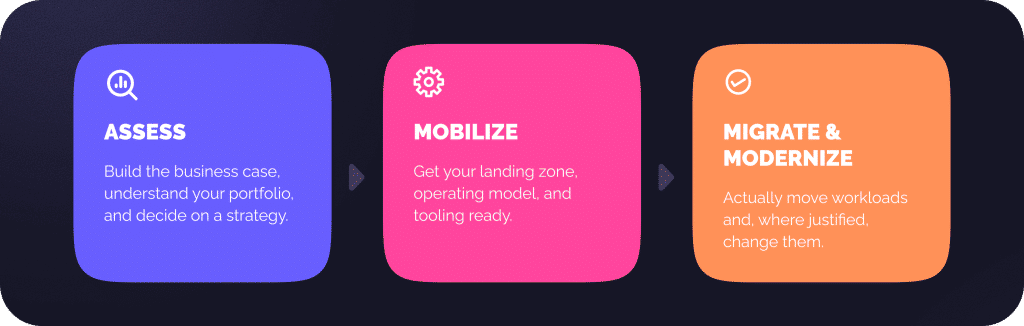
The structure is the well‑known three‑phase model:
Assess phase
For VMware migrations, the Assess phase is where you combine what OLA told you about your actual usage and licensing with your own view of business priorities. You might discover, for example, that 60% of your license spend is concentrated in 20% of your workloads, or that certain applications are technically trivial to move but business‑critical, which changes how you stage waves.
AWS prescriptive guidance on large migrations emphasizes that Assess and Mobilize are the foundation: you’re supposed to enter the later part of MAP – Migrate & Modernize – with a solid portfolio view, not a list of random VMs. MAP funding in Assess typically supports the effort needed to reach that state: detailed analysis, joint workshops, and building a migration backlog with enough detail to commit real resources.
Mobilize phase
In this phase, you start touching AWS more seriously. This is where you design and implement your landing zone, define which accounts and network topology to use, and connect AWS to your VMware world via VPN or Direct Connect. It’s also where you establish foundational practices that MAP explicitly depends on, such as resource tagging. The MAP documentation has an entire section on tagging migrated workloads, because funding, reporting, and governance depend on being able to say “this EC2 fleet over here corresponds to that set of migrated on‑prem workloads over there.”
Migrate & modernize phase
Finally, in migrate & modernize, you apply the engine built in Mobilize to actual workloads. That’s where your VM‑to‑EC2 mappings, your decisions about databases and storage, and your chosen migration tools all come together. AWS’s own guidance suggests splitting this into an initialization stage, where you prove the patterns with pilot migrations, and an implementation stage, where you run waves at scale.
Across all 3 phases, AWS can attach different pots of MAP funding. The AWS partner funding page is fairly clear: MAP funds “support you with migrations or modernizations of any size or workload to AWS, at each phase of the customer’s migration journey,” and they can be provided as cash or AWS promotional credits. The exact size of those pots and the conditions attached depend on your projected AWS usage, your portfolio size, and how compelling your business case is.
Funding: Not free cloud, but shared risk
There’s a misconception that MAP is a way to get free cloud infrastructure from AWS. That’s not how it works.
In practice, MAP funding behaves more like a risk‑sharing mechanism. MAP Credits are issued in connection with the migration plan and migrated workloads. AWS looks at your migration and says: if you move this much of your workload to our platform and do it in a structured way that properly uses our services, we’re willing to put some of our own money on the table up front.
Sometimes that money offsets partner professional services. Sometimes it shows up as AWS credits that reduce your invoices during migration. Sometimes it’s a mix. But in all cases, there are strings attached:
- You’re expected to align your plan with the MAP phases and to adopt basic practices such as tagging.
- You’re expected to actually execute the migration within a realistic timeframe, not run an endless readiness program.
- You’re expected to land in an AWS estate that looks like a serious, long‑term deployment, not a temporary mirror of your VMware clusters.
From a technical perspective, that means you can’t just rely on OLA to tell you “EC2 size X is cheaper than your current VM.” You need to think about how your architecture, operating model, and automation will change. That’s precisely what MAP forces you to do.

What a “good” VMware candidate for OLA + MAP looks like
No AWS document explicitly states that it will only support customers with revenue above X dollars per month. Still, reading between the lines of their guidance and partner materials, some patterns are apparent.
On the infrastructure side, you want enough VMware footprint to make optimization meaningful
If you’re running a handful of VMs, you might still get value from an OLA for education, but the licensing and right‑sizing gains won’t justify a complex program. Once you’re in dozens or hundreds of VMs, especially with a mix of Windows, SQL Server, Oracle, maybe some third‑party middleware, the optimization surface grows dramatically.
On the organizational side, there has to be an appetite to change
If your goal is to replicate your vSphere clusters 1:1 in AWS, keep the same licensing and operational practices, and just hope the bill will magically shrink, OLA and MAP will probably frustrate you. They are biased towards modernization and making your estate easy to evolve on AWS, not towards preserving every quirk of your current setup.
On the commercial side, the migration needs to be large or strategic enough to justify AWS’s co‑investment
That doesn’t always mean massive enterprise. It can also be an ISV (Independent Software Vendor) whose product will run on AWS, or a company in a target industry. But there needs to be a credible story that, after the migration, your AWS usage will be sustained and non‑trivial.
The other ingredient is time. MAP is often framed around a 12‑24‑month horizon for the bulk of the migration, in line with AWS prescriptive guidance on large migrations. If your posture is “we might think about cloud in 5-7 years, no commitments yet,” you can still explore OLA with a long‑term lens, but the funding side of MAP will be harder to justify.
Why it’s worth understanding OLA and MAP before you make a decision
The main value of OLA and MAP lies not in the promise of magic savings or fully funded projects. They inject structure and evidence into a conversation that, without them, tends to be vague and emotional.
OLA forces you to confront how your VMware workloads actually behave and how your licensing money is really being used. MAP forces you to think of migration as a multi‑phase program with clear milestones rather than a weekend adventure, and it offers financial support if you’re serious enough to follow through.
Even if you ultimately decide that now is not the right time to exit VMware, going through an OLA and sketching how MAP would apply to your estate changes the quality of your decisions. You stop saying “we think we’re overspending” and start saying “we know which workloads are responsible, we know what the alternatives cost, and we know what AWS is and isn’t willing to co‑fund.”
That shift (from fog to numbers, from generic fears to specific trade‑offs) is often the most important step in the whole VMware‑to‑AWS story, regardless of how fast you choose to walk the rest of the path.
Let’s start?
Deciding to move a VMware estate is a responsible moment, and you shouldn’t have to guess the numbers. If you’re looking for comprehensive guidance or a free assessment of your specific environment, get in touch with our AWS team. We can help you find the data you need to make an informed decision.
What exactly is the difference between AWS OLA and MAP?
Think of OLA as your diagnostic tool and MAP as your treatment plan. OLA is the assessment that looks under the hood of your VMware environment to find where you’re wasting money on oversized servers or unnecessary licenses. MAP is the broader program that provides the actual funding and professional framework to move those workloads into AWS. You usually start with an OLA to prove the move makes financial sense, then transition into MAP to get AWS to help pay for the journey.
How do I choose between the Lite and Full versions of OLA?
It really comes down to how much time you have and how much detail you need. The Lite version is like a quick snapshot. You export your current inventory, often using a tool like RVTools, and AWS provides a cost estimate within a few days. It’s fast, but it only sees what you’ve allocated, not what you’re actually using. The Full version involves running telemetry for two to four weeks. This is much more powerful because it identifies servers that are idle 90% of the time, allowing you to right-size them and potentially cut your licensing costs by a third or more.
Is MAP just a way to get free AWS credits?
Not quite. AWS isn’t just handing out free cloud capacity. It’s sharing the migration risk with you. MAP funding is tied to a very specific three-phase process: Assess, Mobilize, and Migrate. To get the credits or cash, you have to follow their rules, such as properly tagging your resources and meeting specific migration milestones. It’s a partnership where AWS puts skin in the game to ensure you land in a modernized, long-term environment rather than just a messy copy of your old data center.
Who is the right fit for these programs?
You don’t have to be a massive global corporation, but you do need enough weight in your VMware estate to make the optimization worth the effort. If you have only five or ten VMs, the program’s overhead might outweigh the savings. The best candidates are those with dozens or hundreds of VMs, especially those running expensive Microsoft or Oracle licenses and a leadership team that is actually willing to change how they operate. If your plan is to change absolutely nothing about your setup and just hope the bill gets smaller, you might find the process frustrating.
How long does this whole process usually take?
The initial assessment can happen in a few weeks, but the actual migration through MAP is typically a marathon, not a sprint. Most organizations look at a 12 to 24-month horizon for a full-scale migration. This gives you enough time to build a solid foundation in the Mobilize phase, setting up your security and networking, before you start moving critical workloads in waves. It’s about doing it right the first time so you don’t have to fix expensive mistakes later.