
Mobile development is evolving quickly, and with it, the testing landscape. QA offers huge opportunities to optimize workflows, reduce costs, and enhance coverage. Research published on ResearchGate suggests that with ML, the number of test runs required to maintain defect-detection accuracy might decrease by 30–50%. This shortens feedback loops and reduces total execution time.
Modern applications incorporate AI, but must meet strict regulatory requirements. User expectations are high: apps need to work smoothly across devices and operating systems. The key question is how to address these challenges and ensure reliable performance in the market.
Key takeaways
- One of the largest testing challenges is fragmentation, with over 20,000 mobile device models.
- Modern testing requires AI-driven automation tools that accelerate regression testing and enhance accuracy.
- Security and privacy are paramount; 70% of QA teams have security testing in their workflows.
- In our case study, structured testing cut release time by 30% for a learning app in the fintech sector.
The landscape of mobile app testing in 2026
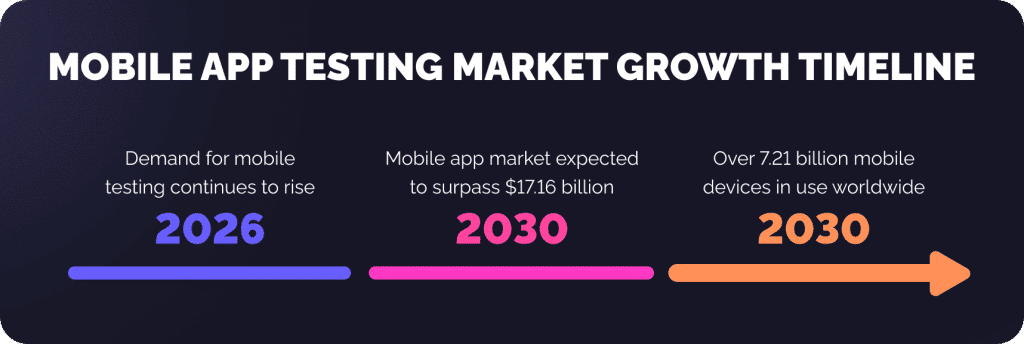
Demand for mobile testing is rising every year. The mobile application testing services market is expected to surpass $17.16 billion by 2030, with over 7.2 billion mobile devices in use worldwide. Since a single bug can damage your app’s reputation, thorough testing across regions, devices, and OS versions is critical.
Emerging trends shape this landscape:
Mobile application development complexity
AI and ML have transformed user interaction. Capabilities like personalized suggestions, predictive tooling, and chatbots require rigorous testing throughout the app lifecycle. Today’s testing also involves AI behaviours, retraining cycles, and prediction stability.
Cross-platform development challenges
Cross-platform frameworks, such as Flutter and React Native, enable software developers to publish Android and iOS apps simultaneously. This is faster but comes with extra challenges for the mobile testing team. Applications must work properly on higher-end models, as well as on budget devices, foldables, and tablets.
Localization testing importance
Users expect apps to work in different languages, regions, and network conditions. Localization testing ensures accurate translation, date formats, and currency conversions.
5G and edge computing
5G and edge computing introduce new variables into testing. Increased network speed and reduced latency impact real-time apps like video streaming, gaming, and AR/VR. Mobile apps are tested under various network conditions to guarantee they function in real-world scenarios.
Key challenges in mobile app testing
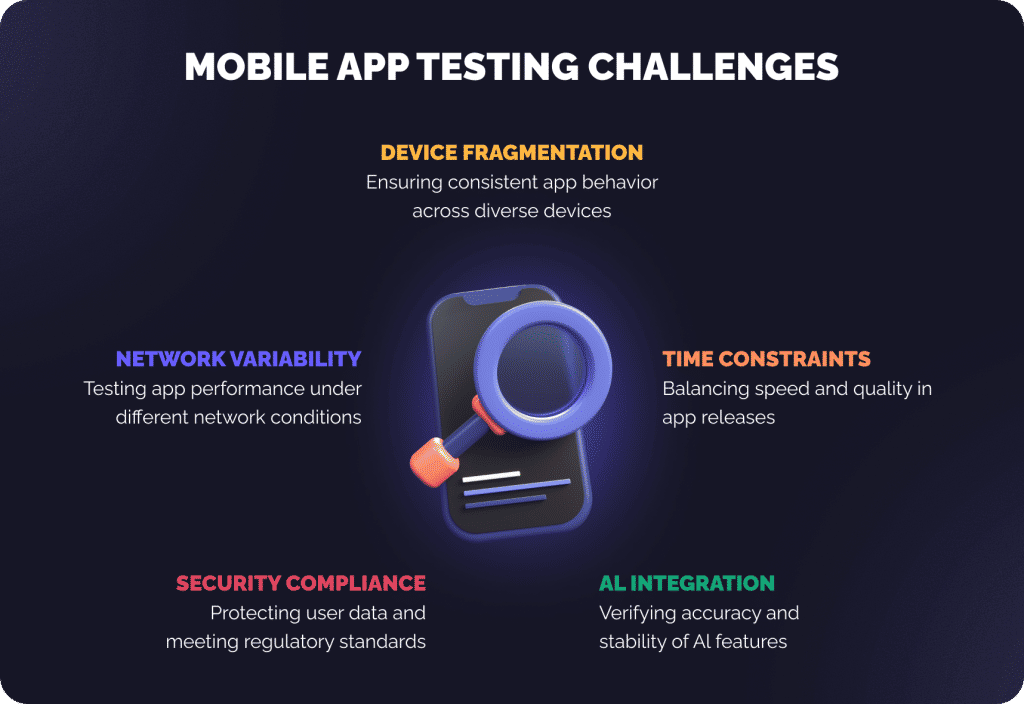
Fragmentation across devices and platforms
Android and iOS devices vary in screen sizes, resolutions, and operating systems. Even models within one OS differ in CPU power, memory, and sensors. These differences may lead to inconsistent behavior and performance in the app.
Moreover, foldable screens and their resolutions require careful UI testing. Using virtual mobile devices and cloud-based device farms is crucial for validating the app’s behavior. Addressing this fragmentation during testing is key to maintaining a reliable experience for every user.
Challenges include:
- Consistency of UI across screen sizes
- Diagnosing device-related performance bottlenecks
- Testing OS-specific functionality and APIs
- Maintaining regression testing coverage for new devices and updates
Shorter time to release and continuous deployment
Modern development processes like Agile and DevOps have shortened release cycles. It is more challenging to support high quality, as the apps usually require daily or weekly updates. In such an environment, automated mobile application testing is essential at an early stage, with continuous integration.
Shift-left testing integrates quality checks into the development pipeline. This early and continuous approach allows the team to identify defects before production. To ensure high quality, most solutions now use a combination of automated and manual tests.
AI and predictive app behaviors
AI integration in apps adds new testing complexities. ML models, predictive analytics, and recommendation engines require verification to ensure accuracy. The process involves testing AI models, updating them, and checking unusual cases.
While test automation is practical for repetitive work, AI-based UX features and decision-making still demand human intervention. The verification of AI potential is essential to achieve stable, accurate, and objective outcomes.
Compliance & security requirements
Mobile applications contain user-sensitive data, and security testing is a critical issue. With GDPR, HIPAA, and other standards, regulatory compliance has tightened up. Testing should include safeguarding user data to prevent unauthorized access and ensure compliance with app store requirements.
The security-first testing practices are:
- Automated vulnerability scanning
- Penetration testing
- Compliance checks with ISO 25010 and ISO 9126
Security testing is crucial in maintaining continued user trust and preventing costly data breaches. It must be integrated into both manual and automated testing workflows.
Network variability and real-world conditions
Mobile apps run on different network bands, such as 5G with high connection speeds and the low-bandwidth 3G. App performance, latency, and reliability are dependent on network variability. Mobile testing involves network bandwidth and offline feature testing, as well as simulating a real-life environment.
In practice, testing on real mobile devices gives more accurate results than emulators. It’s also important to test the app’s functionality under various conditions to ensure user satisfaction and prevent performance issues.
Successful mobile software test strategies
Shift-left test automation
Shift-left testing brings automation into the software development process from the very beginning. By engaging developers early, the team can detect and resolve issues faster. This collaboration improves the final product and is cost-effective, as it identifies issues before escalation.
Manual and automated testing provide comprehensive coverage of mobile apps. Manual testing assesses UX, usability, and complex workflows that are difficult to automate. Automated testing efficiently handles regression checks and repetitive tasks.
Mobile testing stages include:
- functional testing
- UI testing and regression testing
- performance testing
- security testing
Cloud-based device farms and remote testing
With cloud-based testing platforms, testers access a wide range of real devices without maintaining a physical lab. These platforms enable remote testing across various operating systems, screen sizes, and hardware configurations.
Benefits include:
- Multi-device scalable testing
- Accurate real-device performance evaluation
- Lower infrastructure cost and repairs
Cloud testing can also be used to simulate network conditions, such as bandwidth limitations and latency. Nowadays, cloud-based testing services have become a standard.
AI-enhanced test analytics and self-healing scripts
AI-enhanced testing helps identify unstable tests and failure points. Self-healing scripts adapt to small changes in the app and reduce extra maintenance work. AI-driven analytics provide insights into performance, regression coverage, and risks.
The combination of manual testing and AI-driven automation helps achieve high-quality results. Mobile testing challenges can be solved effectively and reliably through continuous testing powered by AI.
Security-first testing practices
Modern mobile apps address threats through automated vulnerability scanning and ISO 25010 compliance. These practices minimize risk, safeguard data, and ensure regulatory compliance.
Inclusive and accessibility testing
Accessibility testing ensures apps comply with WCAG 2.2 standards. Mobile applications must accommodate users with various abilities, including visual, auditory, and motor impairments.
Testing strategies include:
- Manual validation for edge cases
- Automated accessibility tools for broader coverage
Inclusive testing improves usability, expands audience reach, and ensures regulatory compliance, preventing user exclusion.
Tools and new technologies
The mobile testing environment relies on a mix of manual, automated, and AI tools. Native frameworks, cloud platforms, and low-code automation solutions ensure broader coverage, faster releases, and more stable apps.
Manual vs. automated testing tools
| Feature | Manual testing tools | Automated testing tools |
| Purpose | Exploratory, UI, usability | Regression, performance, functional |
| Speed | Slower, human-dependent | Faster, repeatable |
| Coverage | Limited to human testers | Thousands of devices & OS versions |
| Setup | Minimal | Requires scripting & maintenance |
| Best use | Complex UX, edge cases | Repetitive tasks, regression |
AI analytics detect failures, expand coverage, and reveal performance bottlenecks. Mobile app testers benefit from manual, automated, and AI-based testing strategies that cover all aspects.
Below are practical and current tools propelling the testing of mobile applications:
- Appium: Open-source cross-platform mobile apps automation for native, hybrid, web, Android, and iOS.
- BrowserStack App Live: Test on 3,000+ actual devices; 5G and biometric flows.
- Firebase Test Lab: Google’s cloud lab; ML-based UI exploration and smart scripting for Android.
- Espresso: Fast, stable native Android UI testing; integrates with Kotlin DSL.
- XCUITest: Apple’s native UI test framework, optimized for SwiftUI and accessibility flows.
- Detox: End-to-end framework for React Native with auto sync features.
- TestRail: Test case management with AI-assisted creation and health scoring.
- Kobiton: Cloud real-device platform with AI alerts for UI inconsistencies.
- Applitools: AI-powered visual regression testing with WCAG compliance validation.
- Mabl: Low-code, AI automation with voice-guided test creation.
- Katalon Platform: Unified, low-code test platform with built-in AI and cloud integration.
- TestComplete: AI-powered object recognition for GUI testing across platforms.
How Geniusee approaches mobile app testing (Our use case)
| The case study is under NDA. All info is generalized and anonymized, but the testing method and results remain true. |
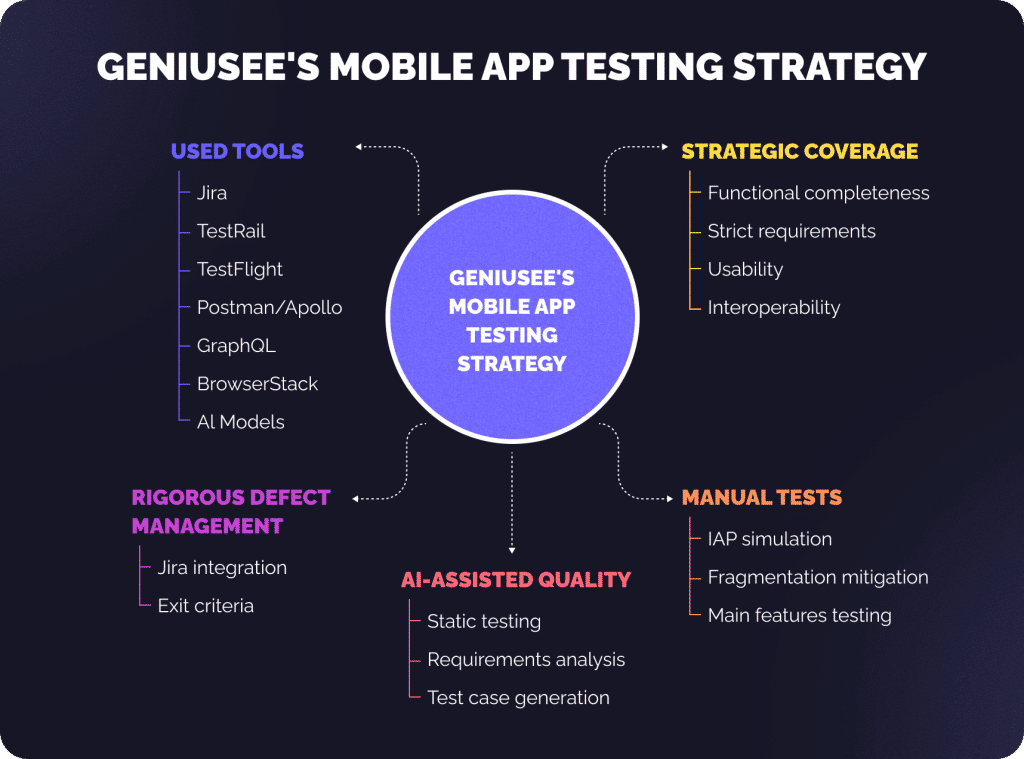
Our testing strategy for this mobile app combines manual tests with AI-driven QA to create a secure learning environment.
Challenge
We had the task of delivering reliable functionality and security across a very heterogeneous mobile market (iOS devices/versions and Android devices/versions). We were working on complex AI-based features (such as weakness analysis generators), and essential in-app purchases (IAP) in a challenging EdTech setting.
Solution
Our multi-layered approach was focused on maximum risk reduction and overall quality assurance:
Strategic functional and non-functional coverage
- The tests were based on functional completeness and strict requirements. Additionally, TestRail monitored all tests.
- Some important aspects were carefully examined:
- Usability: enabling users to complete a task with ease.
- Interoperability: verifying the absence of issues with external integrations, such as Stripe.
Manual tests of risk areas
The QA team used complex, user-experience-driven manual testing. For high-risk flows:
- IAP simulation: We used TestFlight for serious payment testing on iOS.
- Fragmentation mitigation: We tested a wide range of devices and resolutions on DEV and STG.
Our team also tested the main features like interactive quizzes, video lessons, and analytics.
AI-assisted quality (shift-left)
We added AI models to static testing. This helped us identify potential security issues and generate accurate test cases aligned with project requirements. This way, we minimized confusion early in the development cycle.
Rigorous defect management
Developers filled in the affected areas and root cause fields in Jira to address all critical bugs. The discipline facilitated quick root cause analysis and accurate confirmation testing. We strictly followed the exit criteria, which prohibited releasing with any critical or major severity issues.
Used tools
- Jira: For issue tracking and management.
- TestRail: For test case management.
- TestFlight: For simulating in-app purchases on iOS.
- Postman/Apollo GraphQL: For testing the API to ensure that it communicates with the other integrated services (Stripe, SQS, SES).
- BrowserStack: For an effective increase in the coverage of devices, and to carry out portability testing.
- AI models: For static testing, requirements analysis, and test case generation.
Impact
The risk-based strategy, manual UX validation, and early AI support led to a safe, highly reliable, and optimized application. By paying close attention to IAP security, we ensured the app met high regulatory and user standards.
The strategy brought quantifiable results:
- Selective automation and AI-assisted test design reduced regression test time by 32%.
- The early static analysis increases the rate of defect identification by 46% and the requirements coverage.
- 0 critical release issues on the last release.
- The accuracy of in-app purchase verification is 99.3% across iOS cycles, minimizing defects that affect revenue.
This directly supported the client’s mission through a trusted platform.
Conclusion
Mobile testing is critical for a consistent, secure, and high-quality user experience across devices and regions. A combination of manual and automated testing, cloud-based platforms, AI analytics, and accessibility is key to maximizing app performance and reliability.
Summary of key challenges
- Fragmentation across devices and platforms.
- Rapid release cycles require continuous testing.
- AI-driven predictive behaviors.
- Security and compliance requirements.
- Network variability and real-world performance conditions.
It is necessary to take a progressive approach to testing: Shift-left testing actively detects and eliminates bugs earlier in the development cycle. AI-driven automation ensures coverage across the test and significantly speeds up test cycles. Lastly, the security-first testing protects the user information and ensures an essential level of regulatory compliance. With these techniques, you will effectively tackle and complete mobile testing with confidence, positioning your apps to succeed in the marketplace.
Ensure your mobile apps are secure, high-performing, and reliable. Contact Geniusee to implement hybrid test solutions, AI analytics, and cloud-based device testing. Our experts help tackle testing challenges, secure your apps, and provide excellent user experiences across platforms!